Writing research papers in Markdown
A paper is mostly reading, citing and revising with co-authors. Markdown has always been good for the writing and awkward for the rest. Grasmere is a Mac app that does the rest, and leaves the paper a plain Markdown file.
Collect the literature
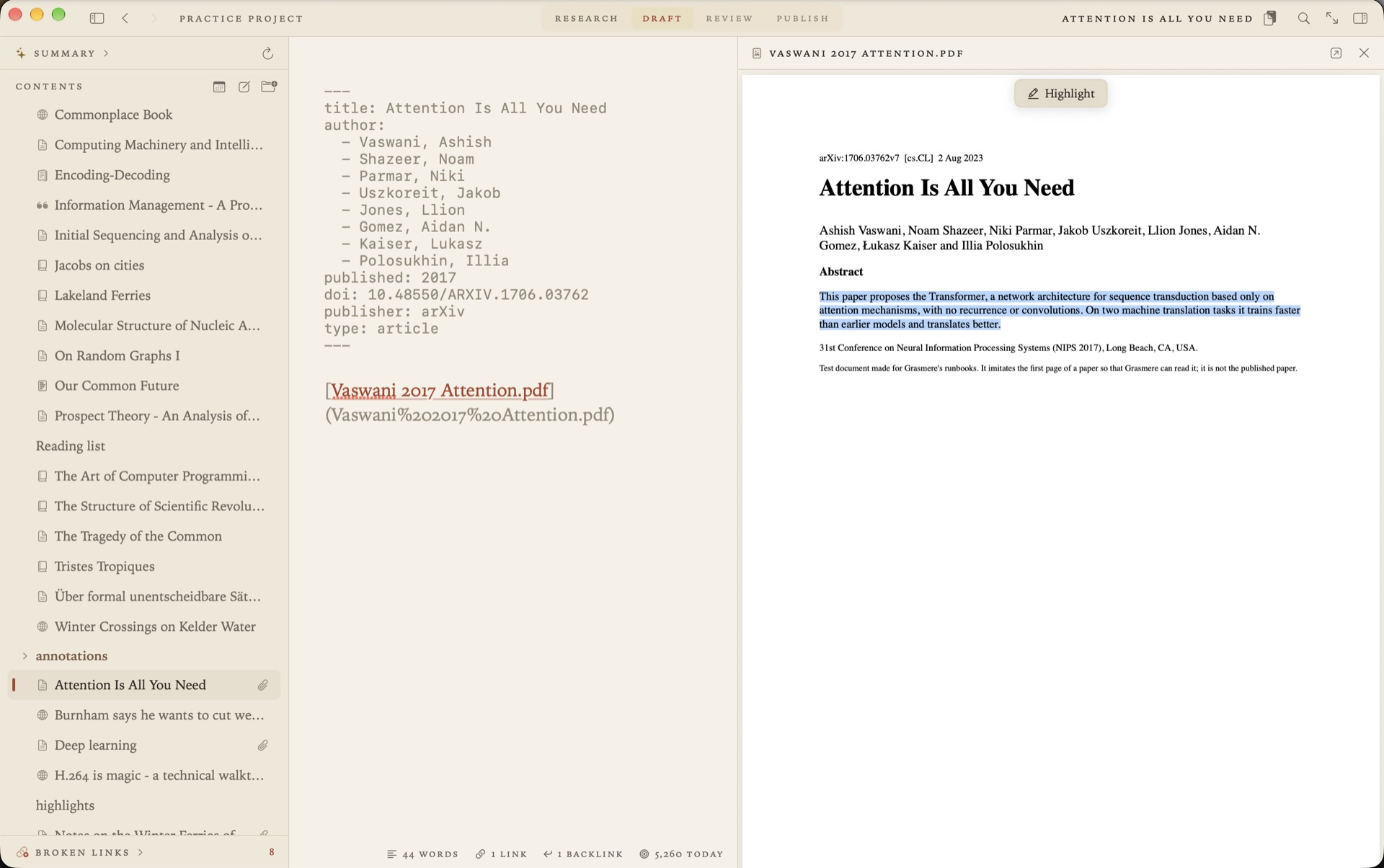
Drop a paper’s PDF into the project’s research folder. Grasmere reads its first pages for a DOI or an arXiv number, looks the paper up, and writes a source beside the PDF with its authors, journal, volume and pages filled in. A paper you haven’t got the PDF for can be added by its DOI alone, with Project ▸ New Source.
If your library is in a reference manager, export it as BibTeX or CSL JSON and import the lot. See Using Zotero with Markdown.
Read and highlight
Open a paper beside its source and select a passage. Highlight keeps it in your highlights document under the paper’s heading, with a link that opens the PDF at that page. The PDF itself isn’t written to.
When you want the passage in your draft, Quote puts it there as a block quote with its citation already attached.
Write
The paper is a Markdown document. Headings, footnotes, tables and code blocks are written the ordinary Markdown way. Tables are drawn as tables, and you edit them a cell at a time. Diagrams are written in Mermaid inside a code block and drawn beneath it, and they go into the PDF and the Word file with everything else.
Cite
Type [@ and pick the paper by author, title or year. Put a page after a comma. To write the author into your sentence, put the year in brackets.
Starters are alive [Field 2019, p. 12](../research/The%20Living%20Loaf.md).
[Field (2019)](../research/The%20Living%20Loaf.md) argues that they are hungry too.
On export the first becomes “(Field, 2019, p. 12)” and the second “Field (2019) argues”, in APA. Choose Harvard, Chicago author-date or MLA and they’re written that way instead. The reference list at the end holds the sources you cited and no others.
Before you send anything, the Research stage lists your loose ends, such as sources you never cited and links that lead nowhere.
Revise with co-authors who use Word
This is where writing a paper in Markdown usually falls down. Your co-authors and your supervisor use Word, and they’ll return the draft with tracked changes.
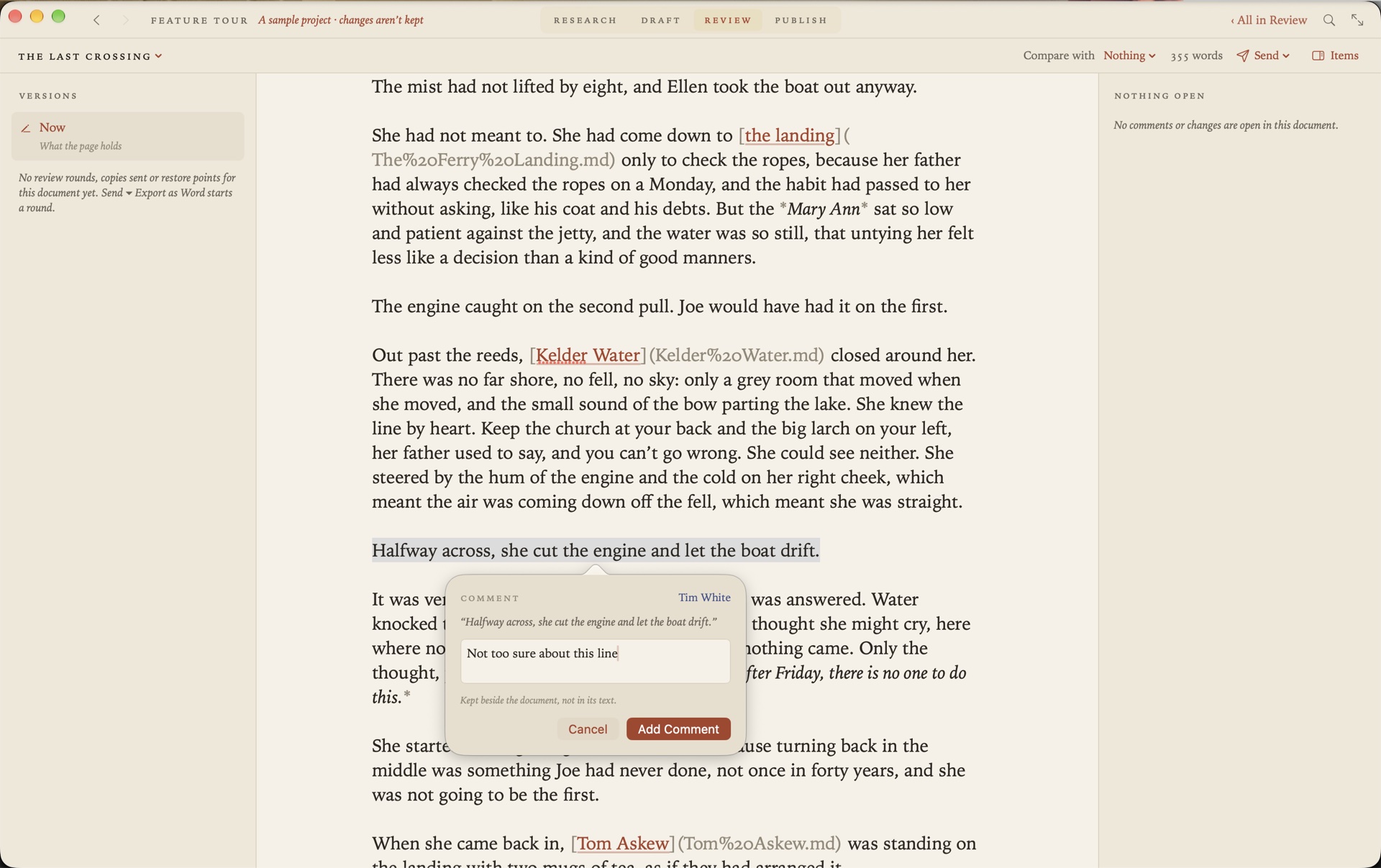
In Grasmere you send the paper as a Word file from the Review screen. They comment and edit in Word, Pages or Google Docs. Drop the returned file back in and each change and comment appears in the page beside your text, in the reviewer’s colour, to accept, reject, defer or reply to. For the next round, Export with My Changes Marked shows them what you did with their suggestions. See Markdown to Word, and back again.
Submit
Most journals ask for Word or PDF. The Word file has Word’s own heading styles, real footnotes, embedded figures and the bibliography. The PDF is typeset, with footnotes at the foot of the page and working links.
New in 1.6. For a journal that wants LaTeX, the Publish stage writes a .tex in the journal’s template, with a .bib of the sources you cited. See Using LaTeX with Markdown.
What to check first
Grasmere writes four author-date styles. If your journal wants a numbered style such as Vancouver or IEEE, a footnote style, or its own house style, Grasmere’s Word and PDF won’t give you that.
Questions
Do my co-authors need Grasmere?
No. They need Word, Pages or Google Docs, and they review as they always have.
Can I keep the paper in git?
Yes. A project is a folder of plain files. If it’s a git repository, Grasmere can commit as you save, and the Review screen compares the paper with any earlier commit.
Is anything sent anywhere?
Not unless you ask. A DOI lookup sends the DOI and nothing else. There’s no account, and Grasmere has no server. See Privacy.
Write the next paper in Markdown.
Drop in a PDF, cite it, and send your co-author a Word file. The trial is free for 14 days.
Download for macOS Free for 14 days, then $14.99 once · macOS 26+