Writing Replay
New in 1.1.
If you need to show someone that you wrote a piece yourself, and when, Grasmere can record how a document is written and play it back. It’s an experimental feature, and it’s off until you turn it on in Settings ▸ General ▸ Writing replay.
Recording a document
With the feature on, open the document and choose File ▸ Record This Document’s Writing. A small red dot appears beside the document’s name in the running head while it’s recording.
From then on, Grasmere records every change to the document’s text, and how it arrived:
- typed at the keyboard, grouped into words
- pasted or dropped in
- inserted by Grasmere, such as a link from ⌘K, a task box or a saved answer
- changed outside Grasmere by another app, sync or git, picked up when Grasmere next reads the file
- sent by another program, for keystrokes that didn’t come from the keyboard itself
Anything already in the document when recording began counts as there at the start.
Recording is per document. Other documents aren’t recorded, and opening one doesn’t stop the recording. The dot shows on the document being recorded.
To stop, choose Record This Document’s Writing again. The record is kept and covers everything written up to then. You can carry on editing afterwards, and the replay will say so. To remove the record, choose File ▸ Delete This Document’s Writing Record.
The record is kept on your Mac, in Grasmere’s own storage beside the project’s other app data. It’s never put in the document, which stays a plain Markdown file. It follows the document if you rename or move it in Grasmere, and goes when the document is deleted or merged away.
Timestamps
On its own, a record is only your word. So Grasmere fixes it in time as you go.
A minute after you stop typing, when you close the document, and when you quit, Grasmere makes a checkpoint, a hash of the record so far. It sends the hash to a public timestamp service, which signs it with the time using RFC 3161, the standard used for signing software. The receipt is kept with the record.
Only the hash goes out, never any of your text. The service does see your Mac’s internet address and when you write.
Each checkpoint is chained to the ones before. That means a record can’t be rewritten afterwards without the stamps failing, and a record made up later can’t carry stamps from the past.
The service is Sectigo’s to begin with. To use another, give its RFC 3161 address in Settings ▸ General ▸ Writing replay. If you’re offline, checkpoints wait and are stamped when you’re next connected.
Playing it back
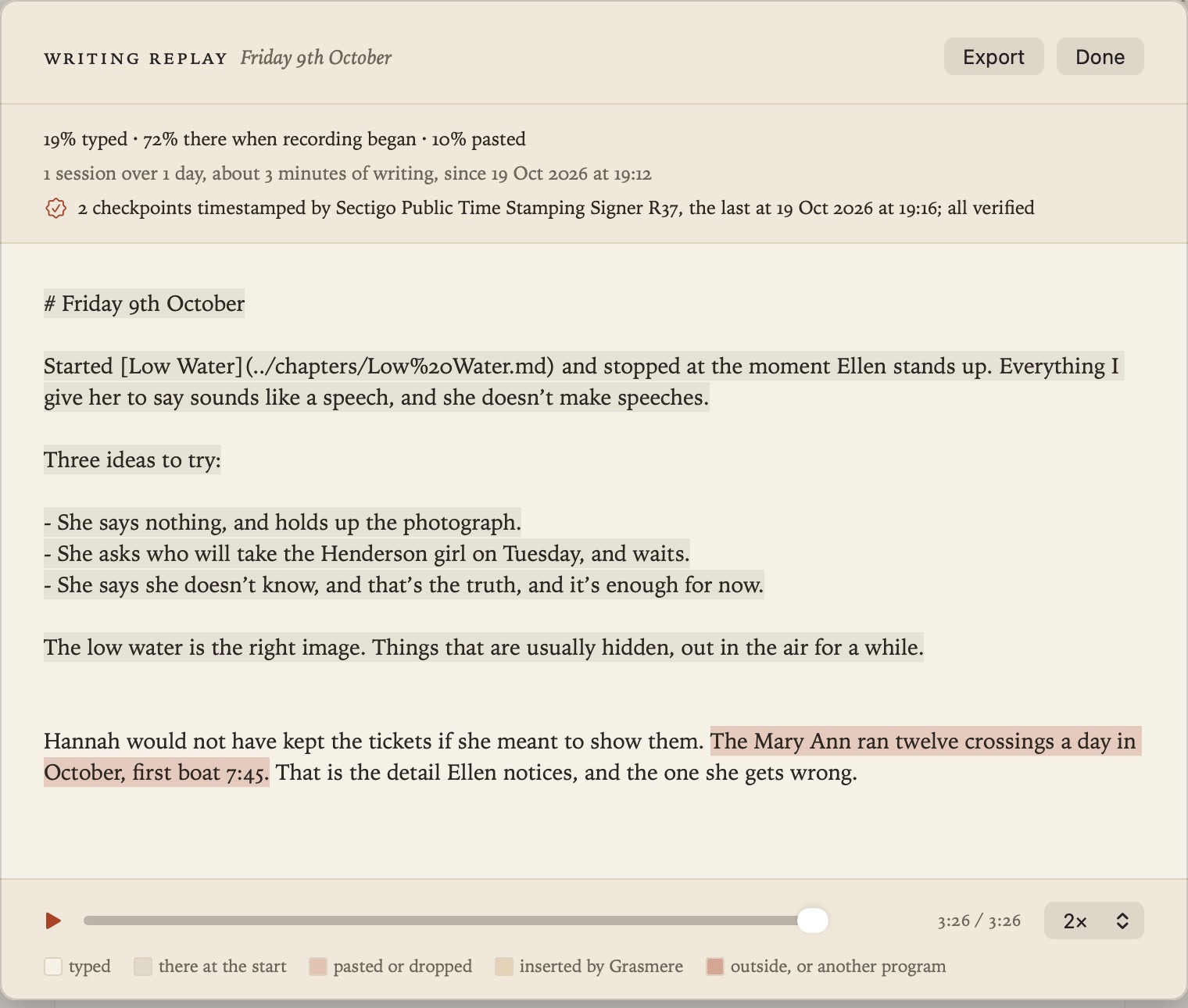
Choose File ▸ This Document’s Writing Replay to watch it. You can press play, scrub, or change the speed, and long pauses are shortened. Each part of the text is shaded by where it came from.
The top of the sheet says how much was typed and how many sessions there were over how many days. It also says whether the record checks out, which means every entry fits, every checkpoint matches, and every timestamp’s signature is verified against your Mac’s certificate store.
Sharing
Export in the sheet saves the replay as a single web page that plays in any browser, with nothing to install.
Before it does, Grasmere reminds you what the page shows: everything written and deleted in the document since recording began, and when, including text that isn’t in the final version. Only share it with people you’re happy to see all of that.
The page says whether the record checked out in Grasmere when you exported it. A browser can replay the text, but it can’t check the certificates itself.
What it shows, and what it can’t
A replay shows how text got into Grasmere and when. It can tell typing apart from pasting, from Grasmere’s own insertions, from changes made elsewhere and from keystrokes another program sent.
It can’t tell whether something typed at the keyboard was composed there or retyped by hand from somewhere else. Copying does tend to look different, though. It’s steady, with few second thoughts.
If a record is missing or broken, that only means there’s nothing to show. It doesn’t mean anything is wrong.