Writing Goals
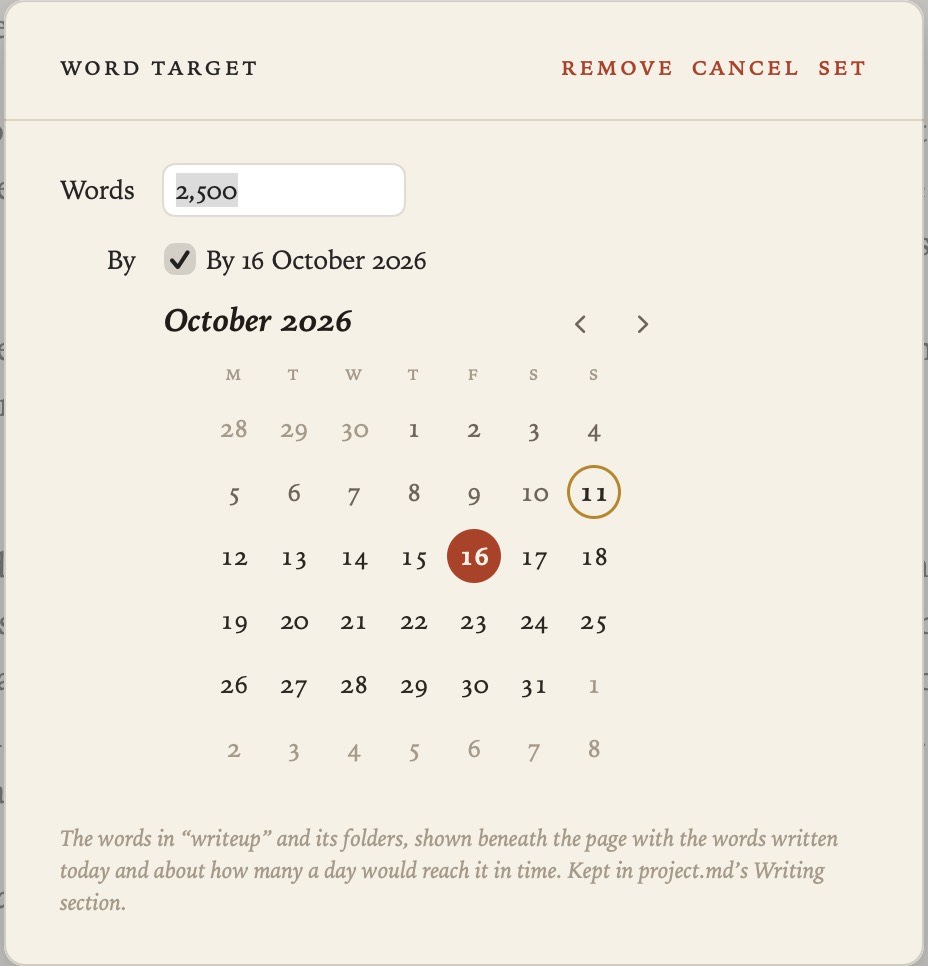
If you’re aiming for a length, give your project, or any folder in it, a number of words to reach, and a date if you have one. Grasmere shows how far you’ve got, what you’ve written today, and roughly how many words a day would get you there in time.
Setting a target
- Project ▸ Set Word Target sets a target for the whole project.
- Right-click a folder in the contents and choose Set Word Target to set one for that folder, such as a manuscript or a chapter.
Enter the number of words. For a deadline, tick By and choose the date. Remove takes the target away again.
Watching your progress
The bar beneath the page shows the target for the document you’re in. It reads something like this:

8,015 of 12,000 · 640 today · ~190 a day to 31 Oct
In a folder with its own target, you see that folder’s numbers. Anywhere else, you see the project’s. With no target at all, the bar shows only the words you’ve written today.
Today’s count starts from where you were this morning, and carries on if you quit and come back the same day. Words you delete come off it.
Where targets are kept
Your targets and daily word counts are written in plain Markdown, in the Writing section of project.md. You can read or edit them in any app.
## Writing

Target: 80,000 words by 2027-03-01
- [Manuscript](manuscript/): 60,000 words by 2027-02-01

| Day | Words |
|---|---|
| 2026-10-09 | 1,240 |
| 2026-10-10 | 860 |
Each day you write adds a row, and only today’s row ever changes. To move the deadline, click the date in project.md, as you would any date.
Related
- Writing and Formatting, for the word count of a document or a selection
- Publishing, for turning a finished folder into a manuscript