Sending thesis chapters to your supervisor
Your supervisor wants a Word file, and sends it back with tracked changes and comments in the margin. You’d rather write the thesis in plain text, a chapter to a file, under version control. Grasmere lets you do both: each chapter goes out as Word and the comments come back onto your Markdown.
The usual choice, and why it’s a bad one
Most students pick Word on day one because the supervisor uses it, then spend three years with a 200-page file that’s slow to open, hard to search, and impossible to see the history of. The alternative, writing in LaTeX or Markdown and converting to Word for each meeting, breaks down the first time comments come back and have to be copied across by hand.
The way out is to keep the chapters as Markdown files and make the Word file a thing that’s sent and received, not the thing you edit.
One chapter at a time
- Open the chapter and press ⇧⌘R for its Review screen.
- Choose Send ▸ Export as Word. The file has real headings and footnotes, and your citations and reference list in APA, Harvard, Chicago or MLA. It’s named for the round, “Chapter 3 (Round 1).docx”.
- Email it. Your supervisor opens it in Word and does what supervisors do.
- When it comes back, drop the file on the Review screen. Every tracked change and comment appears beside the paragraph it belongs to, in your supervisor’s colour.
- Go through them. Accept, Reject or Defer each one. Reply to comments. Resolve what’s dealt with.
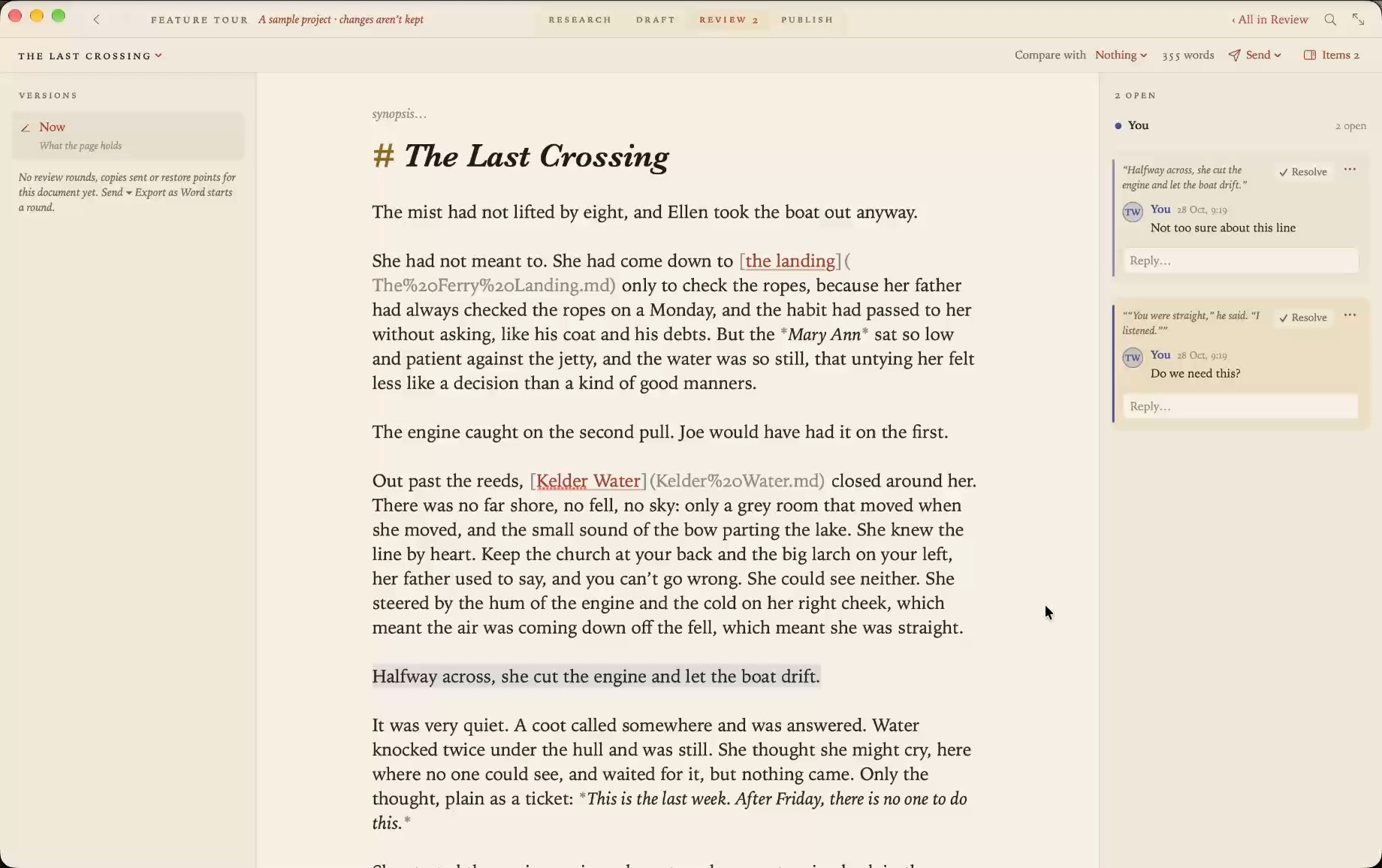
A second round starts the next time you send. Round 2 goes out with your revisions in it, and if you choose Export with My Changes Marked, your supervisor sees your edits since Round 1 as tracked changes in Word, which is how they’d expect to see them.
What your supervisor sees
A Word document. Nothing in it says Markdown. Headings use Word’s heading styles, so the navigation pane works. Footnotes are Word footnotes. Citations are written out in the style you chose, with the reference list at the end. If they use Pages, LibreOffice or Google Docs with Suggesting on, that works too.
While the chapter is away
Keep writing. Grasmere keeps a copy of what it sent, so when the file returns each comment is placed against the paragraph as it now stands. If you and your supervisor both changed the same sentence, you’re shown the sent, suggested and current versions and choose.
The rest of the thesis
- Sources. Add papers by DOI and books by ISBN, or import your Zotero library as BibTeX or CSL JSON. Cite by typing
[@. See citations in Markdown without BibTeX. - History. Every round, every copy sent and every restore point is listed under Versions, with git commits beside them if the folder is a repository. Compare any two.
- The whole thing. When it’s time for the full draft, Send ▸ Export as Word from the thesis folder writes one file per chapter, and the Publish stage makes a single Word document or PDF of all of it.
- Submission. New in 1.6. If your university wants LaTeX, the Publish stage writes the thesis into a
.textemplate. See using LaTeX with Markdown.
Questions
Will my supervisor know I’m not using Word?
Only if you tell them. The file is an ordinary .docx.
What about comments on the document as a whole?
A comment that can’t be placed against a paragraph is listed under Unplaced, and for a whole book is collected in a Review notes document, rather than lost.
Can two people review the same chapter?
Yes. Each reviewer has a colour, and Accept All and Reject All work per reviewer.
What does it cost a student?
$14.99, once, after a 14-day trial. There’s no subscription.
Write the thesis in Markdown. Send it as Word.
Grasmere is a Mac app for long writing in plain files. Sources, citations, review and publishing are built in. Try it free for 14 days.
Download for macOS Free for 14 days, then $14.99 once · macOS 26+Related
- Writing a thesis in Markdown
- Tracked changes from Word, back into your Markdown
- A Markdown editor for students
- Using Zotero with Markdown
- More on writing in Markdown
Last updated .