An academic CV in Markdown, typeset by LaTeX
A CV changes every few months and should look the same for years. Keep the words in a Markdown file you can edit anywhere, and let a LaTeX template do the typesetting. This template is free. It works with Pandoc, and with Grasmere on a Mac.
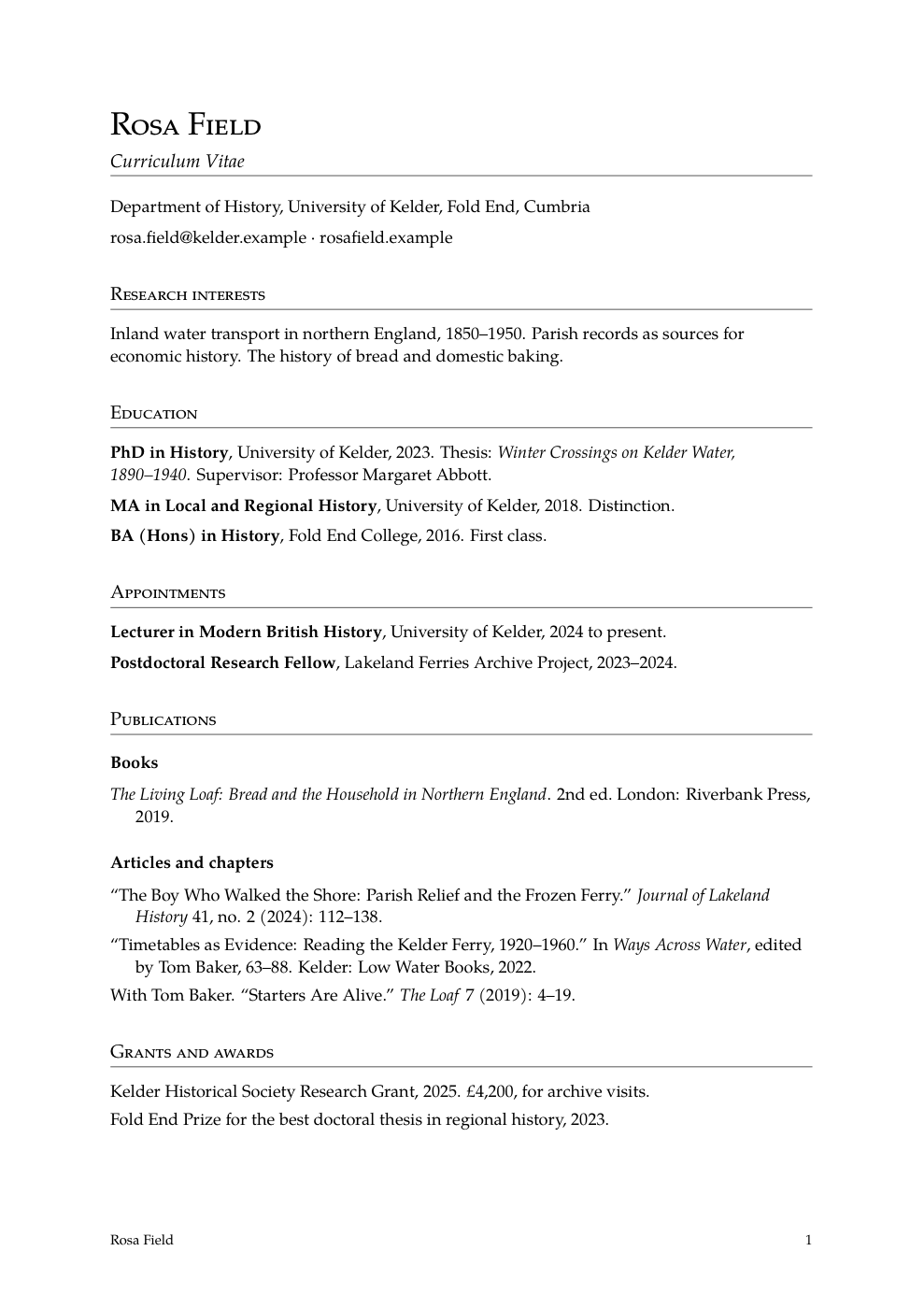
What’s in the download
academic-cv.tex, the template. You can also open it on its own.cv.md, an example CV in Markdown to write over.cv.pdf, what the example looks like when it’s typeset.
Write the CV in Markdown
The CV is an ordinary Markdown document. Your name goes at the top, as the author. Each ## heading is a section, and a list holds the things you’d expect to list.
---
author: Rosa Field
---

# Curriculum Vitae

Department of History, University of Kelder, Fold End, Cumbria

[email protected] · [rosafield.example](https://rosafield.example)

## Education

**PhD in History**, University of Kelder, 2023. Thesis: *Winter Crossings
on Kelder Water, 1890–1940*. Supervisor: Professor Margaret Abbott.

## Publications

### Books

- *The Living Loaf: Bread and the Household in Northern England*.
  2nd ed. London: Riverbank Press, 2019.

### Articles and chapters

- “The Boy Who Walked the Shore: Parish Relief and the Frozen Ferry.”
  *Journal of Lakeland History* 41, no. 2 (2024): 112–138.
There’s nothing to learn beyond Markdown, and nothing in the file that only one app understands. When you publish something new, you add a line.
What the template does with it
| In your Markdown | On the page |
|---|---|
| The author | Your name, large, in small capitals, and at the foot of each page. |
The # title | A line in italics beneath your name. |
A ## heading | A section, in small capitals over a rule. |
A ### heading | A bold heading inside a section, such as Books. |
| A list | Entries with a hanging indent and no bullets, as a list of publications is usually set. |
| A list inside a list | Bullets. |
| Bold, italics and links | The same. Links can be clicked in the PDF. |
The type is Palatino, on A4 with one-inch margins, and the pages are numbered.
Make the PDF with Pandoc
If you have Pandoc and a LaTeX engine, one command makes the PDF.
pandoc cv.md --shift-heading-level-by=-1 --template academic-cv.tex -o cv.pdfThe --shift-heading-level-by=-1 part makes the # heading the title and each ## a section. Add --pdf-engine=tectonic or --pdf-engine=xelatex to choose the engine.
With no LaTeX on your computer, ask Pandoc for the .tex and compile it in Overleaf, which is free and runs in the browser.
pandoc cv.md --shift-heading-level-by=-1 --template academic-cv.tex -o cv.texMake it with Grasmere
New in 1.6. Grasmere is a Mac app for long writing in Markdown, and its Publish stage writes LaTeX in a template of your choosing.
- Put
academic-cv.texanywhere in your project. A.texfile with a place marked for the text is a template. - Open your CV and press ⌃T to put it in hand, then go to the Publish stage.
- Type “Curriculum Vitae” as the Title and your name as the Author.
- Click LaTeX, choose a folder, and choose academic-cv as the template.
Grasmere writes the .tex into the folder. Open it in TeXShop or upload it to Overleaf to make the PDF. Grasmere takes your name from the Author box, so the author: line in the file is only for Pandoc.
Change how it looks
The template is one short file with a comment over each part, and it’s yours to edit.
- Paper. Change
a4papertoletterpaperfor US Letter, andmargin=1infor the margins. - Type. Swap the Palatino lines for another font package.
- Bullets. Remove the line that begins
\setlist[itemize,1]to have ordinary bulleted lists. - The date. The foot of each page shows the date when one is given. Grasmere gives today’s. With Pandoc, add
date:besideauthor:.
Questions
Do I need Grasmere to use it?
No. It’s a Pandoc template, and it works anywhere Pandoc does.
Which LaTeX engine does it need?
It’s written for pdfLaTeX, XeLaTeX and LuaLaTeX, and uses only packages that come with TeX Live.
Can I use it for a résumé?
Yes. Leave out the sections you don’t need and keep it to a page or two. It’s plain enough for either.
May I change it and share it?
Yes, for any purpose.
The rest of your writing, in Markdown too.
Grasmere takes a thesis, a paper or a book from sources to submission in plain Markdown files. The trial is free for 14 days.
Download for macOS Free for 14 days, then $14.99 once · macOS 26+Related
- Using LaTeX with Markdown
- Writing a thesis in Markdown
- A Markdown editor for students
- Markdown to PDF on a Mac
- More on writing in Markdown
Last updated .